How to Activate eSIM on iPhone and Android in Nigeria
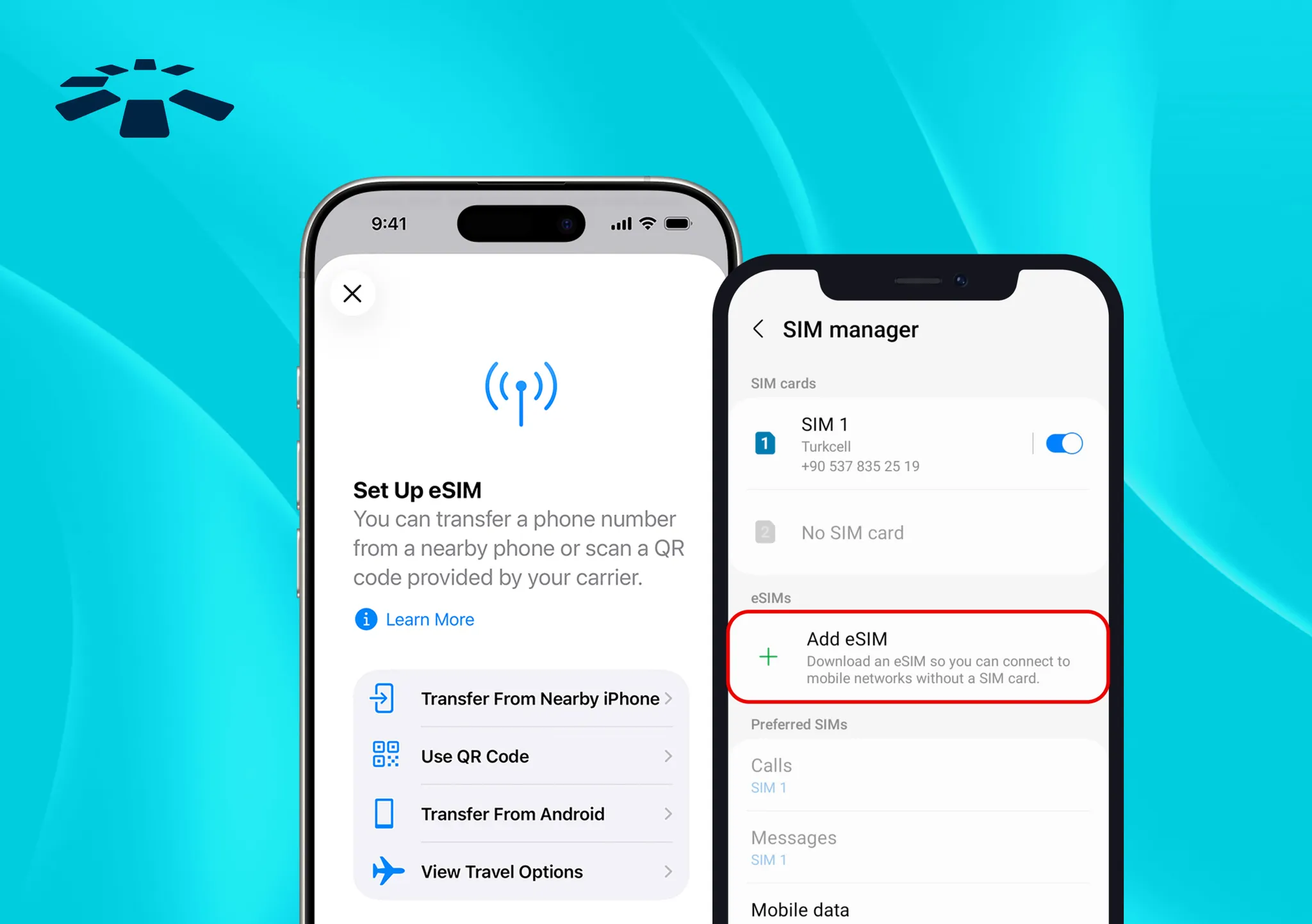
A few months ago, a friend of mine bought a new phone online. Excited, she quickly unboxed the phone to insert her SIM card with joy. Then she realised there was no SIM tray.
For a moment, panic set in. “Did they sell me a faulty phone?” What she didn’t realise was that her new device supports eSIM, which means it doesn’t require a physical card.
If you’ve just bought a new smartphone or you’re thinking about upgrading, you might be in the same situation. The good news is, activating an eSIM in Nigeria is easier than you think.
In this guide, I’ll walk you through how to activate an eSIM on an Android and an iPhone device in Nigeria.
How to Activate eSIM on iPhone
If you’re using an iPhone XR or any newer model, chances are your phone already supports eSIM. Many people don’t even realise it’s there.
Major networks like MTN, Airtel, and Glo now offer eSIM services, so you’re not stuck with just a physical SIM anymore.
To activate your eSIM, visit your network provider, get your QR code, and scan it on your phone. Your eSIM will be activated.
Step 1: Visit Your Network Provider
The first thing you need to do is visit your network provider’s office. Request to activate an eSIM.
In most cases, it’s treated as a SIM swap, which means they’ll move your number from your physical SIM to a digital eSIM.
They’ll generate and give you a QR code. That QR code is very important. That’s what you will scan on your iPhone to download your line digitally.
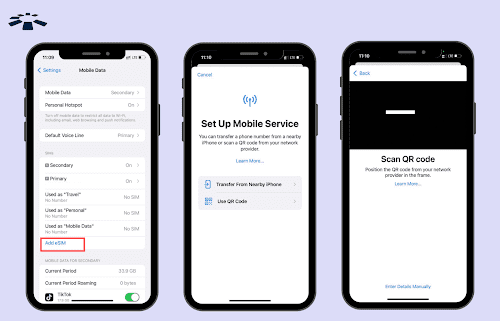
Step 2: Add the eSIM to your iPhone
- Open Settings
- Go to Cellular or Mobile Data
- Select “Add eSIM”
- Choose “Use QR Code
- Scan the QR code given to you
- Follow the on-screen instructions
Your phone will then download the eSIM profile. Give it a few seconds, and it should connect to the network automatically.
After activation, your iPhone will ask you to label the line. You can choose something simple like: Primary, Business, Travel, or Personal.
This helps you stay organised, especially if you’re using dual SIM.
How to Activate eSIM on Android
Most premium Android phones now support eSIM, especially devices like the Samsung Galaxy S series or Google Pixel phones.
To activate your eSIM on your Android phone, you will also need to visit your network provider to get your QR code, then scan it on your phone, and your eSIM will be active.
Step 1: Get Your eSIM QR Code
To get your eSIM QR code, you will need to visit your network provider (MTN or Airtel) and request eSIM activation.
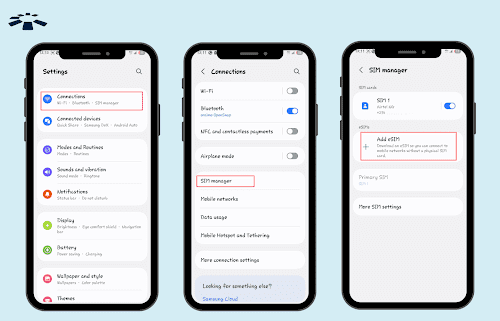
Step 2: Activate eSIM on Android
To activate eSIM on your Android, go to your phone settings, tap on “Network & Internet,” then select “SIMs or Mobile Network.” Click on “Add eSIM,” scan the QR code, and confirm your activation.
Expert Tip: Ensure Wi-Fi is turned on throughout the process to activate your eSIM easily. You can also restart your device if your eSIM did not activate immediately.
Where to Buy an eSIM in Nigeria
You can buy your eSIM from your network provider and online platforms.
1. Nigerian Network Providers (Local eSIMs)
If you want an eSIM for your Nigerian phone number, you’ll need to visit a network provider’s service centre. Most network providers now sell eSIM activation.
At the service centre, you simply request an eSIM, and they’ll generate a QR code for you right there.
This type of eSIM is tied to your Nigerian phone number, lets you use calls, texts, and data just like your regular SIM, and requires your NIN to be linked.
2. Online eSIM Platforms (Travel & Data eSIMs)
If what you want is data-only eSIMs — especially for travel or flexible data plans. Then you don’t need to visit a physical store at all.
Platforms like Cardtonic let you buy digital eSIM plans online, which you can install directly on your phone.
This type of eSIM is great if you are someone who travels abroad and needs data without roaming charges, want data-only plans for your phone or tablet, or prefer buying and installing online without visiting a service centre.
Just purchase the eSIM on the platform, scan the QR code, and you’re good to go.
4 Requirements to Activate eSIM in Nigeria
The four requirements to activate eSIM in Nigeria are: an eSIM-compatible phone, NIN linked to your phone number, a QR code from your network provider, and a stable internet connection.
1. An eSIM-Compatible Phone
I would like to let you know that not every smartphone supports eSIM.
Even if your phone is new, don’t assume. Go to your Settings and check if you see an option like “Add eSIM” under mobile network or SIM settings. If that option isn’t there, your device likely doesn’t support it.
2. NIN Linked to Your Phone Number
In Nigeria, every active SIM must be linked to a valid NIN.
If your NIN isn’t properly linked to your phone number, the activation may fail, even if everything else is correct. It’s best to confirm that your NIN is properly linked before requesting the eSIM swap.
3. A QR Code or Activation Details From Your Provider
This part is very important. To activate an eSIM, you need activation details from wherever you purchased it.
In most cases, this comes as a QR code. If you’re activating a local Nigerian line, providers like MTN or Airtel will generate a QR code for you when you request eSIM activation.
If you’re buying a data-only eSIM from an online platform like Cardtonic, you’ll also receive a QR code digitally after purchase.
However, some providers allow you to manually add an eSIM by entering: SM-DP+ address, activation code and confirmation code (if required). This method depends on the provider. Most eSIMs today are activated by scanning a QR code because it’s faster and easier.
4. Stable Internet Connection
Here’s something many people forget: your phone needs the internet to download the eSIM profile.
After scanning the QR code, make sure you are connected to Wi-Fi, or you have a working mobile data connection. Without internet access, the activation won’t complete.
Frequently Asked Questions About How to Activate eSIM in Nigeria
1. How Much Does eSIM Activation Cost in Nigeria?
The cost depends on your network provider. In most cases, it is treated as a SIM swap. Therefore, you may pay a small administrative fee. Prices can change, so confirm with your network provider before visiting the service centre.
2. Can I Use a Data eSIM Alongside my Regular eSIM?
Yes, you can! As long as your phone supports multiple SIM profiles. Most modern smartphones allow you to use one regular SIM (physical or eSIM) for calls, SMS, and one data eSIM for internet access. Just go to your phone’s SIM settings and choose which line handles calls, SMS, and mobile data
3. What Happens If I Reset My Phone?
If you perform a factory reset on your phone, your eSIM profile may be deleted. You may need to scan the QR code again or request a new one from your network provider.
4. Do I Need NIN to Activate My Data eSIM?
In most cases, no. You don’t need NIN to activate a data-only eSIM purchased online. This is because a NIN is required in Nigeria to activate local network SIM cards tied to your phone number (like MTN or Airtel lines). But many data eSIMs, bought from online platforms like Cardtonic, are not tied to a Nigerian phone number, and they are activated digitally.
5. Can I Transfer an eSIM to Another Phone?
Yes, but not directly. All you will need to do is deactivate the eSIM on your old phone, request a new QR code from your network provider, and activate it on the new device.
Conclusion
Most Nigerians now prefer eSIMs because they don’t have to worry about losing a tiny SIM card or entering a PIN to open a SIM tray.
Whether you’re using an iPhone or an Android device, activating an eSIM is straightforward once you get your QR code from your network provider.
And if you’re not necessarily looking to convert your Nigerian number but simply want a flexible data-only eSIM, platforms like Cardtonic make it easy to purchase and activate one online, without you visiting a service centre.


 Get on iPhone
 Get on Android