How to Make Ikeja Electric Payment Online: Step-by-Step Guide
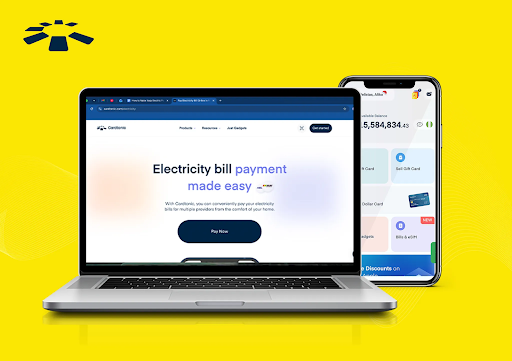
Gone are the days when we had to visit IKEDC (Ikeja Electricity Distribution Company) offices and join long queues to pay for Ikeja Electric bills. Now, it has evolved into something we can pay for from the comfort of our home, anytime and any day.
However, this option is only easy when you know how to pay electricity bills online and which bill app to use. You don’t want to make costly mistakes such as paying for the wrong meter number, choosing the wrong electricity plan, or even losing money to fake bill payment apps.
To help you avoid these common issues, this article provides a step-by-step guide on how to pay Ikeja Electric bills online using reliable bill payment apps. It also offers practical solutions to common payment errors and answers questions you may have about paying electricity bills online.
How to Pay Ikeja Electricity Bill Online
You can pay your Ikeja Electricity bill on the Cardtonic app and earn up to 5% cashback, or pay directly on the Ikeja Electric payment portal.
1. Cardtonic:
If you’re looking for a convenient way to pay your Ikeja Electric bill online, with extra perks and guaranteed security, Cardtonic is your best bet.
This app allows you to make electricity bill payments without any unnecessary delays. Immediately after your transaction is complete, which typically takes a few minutes, you will receive your valid meter token or a confirmation message. You also have the flexibility to pay with various payment methods, such as local bank transfer or Cardtonic wallet, depending on what works for you.
Paying your electricity bills on Cardtonic also comes with extra perks; you can earn up to 5% cashback during promotions.
No doubt, paying bills can be overwhelming, but at least Cardtonic has made the process easier with additional opportunities to earn every time you pay bills.
Here is a Step-by-Step Guide on How to Pay Your Electricity bill on Cardtonic:
Step 1: Visit the Cardtonic website or download the Cardtonic app on the Play Store or App Store.
Step 2: Log in to your Cardtonic account or create a new one if you are a new user.
Step 3: Fund your Cardtonic wallet with a bank transfer.
Step 4: Navigate to the ‘Bill Payment’ section and click the ‘Electricity’ option.
Step 5: Select Ikeja Electricity Distribution Company (IKEDC) from the list of providers.
Step 6: Select your tariff plan. I.e., prepaid or postpaid.
Note: Select the ‘Prepaid’ option if you’re using the Ikeja Electric meter, and select the ‘Postpaid’ option if you receive a monthly electricity bill.
Step 7: Enter the number of units you wish to purchase or the amount shown on your bill.
Step 8: Review your order details to ensure they’re correct.
Step 9: Click the ‘Purchase’ button and enter your PIN to complete the payment.
Your meter token or confirmation message will be sent to your email immediately upon successful completion of your transaction.
Pro Tip: Watch the video below for a more detailed guide on how to pay electricity bills on the Cardtonic app.
2. Ikeja Electric Payment Portal:
If you’re the type who prefers to pay your electricity bills directly from the source, even if it comes with limited options, then the Ikeja Electric Payment portal is another reliable option to consider. This method eliminates common issues, such as purchasing fake meter tokens or receiving no confirmation message after a successful transaction. Their customer support team is also just a call away if you encounter any payment errors.
The only limitation with this option is that you can only pay with your local debit or credit card.
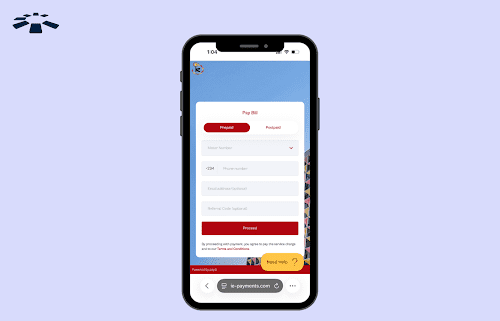
Here is a Step-by-Step Guide on How to Pay Electricity Bills on the Ikeja Electric Portal:
Step 1: Visit the Ikeja Electric portal.
Step 2: Select your tariff plan. I.e., prepaid or postpaid.
Note: Click the ‘Prepaid’ tab if you’re using the Ikeja Electric prepaid meter, and click the ‘Postpaid’ tab if you receive a monthly electricity bill.
Step 3: Carefully enter your meter number or account number.
Pro Tip: You can find your IKEDC meter number below the barcode on your meter box or physical card. It is usually 11-digit.
Step 4: Enter your phone number and email.
Step 5: Review your details and click the ‘Proceed’ button to continue.
Step 6: Enter the number of units you wish to buy or the amount shown on your bill.
Step 7: Follow the on-screen instructions to complete your purchase.
You should receive your meter token or confirmation message within a few minutes.
How to Check Ikeja Postpaid Electricity Bill Online
To check your Ikeja Electricity bill (postpaid) online, visit the Ikeja Electric billing portal and log in with your account details. Click the ‘Continue’ button to check your monthly bills.
Step 1: Visit the Ikeja Electric billing portal.
Step 2: Enter your account number and click the “Continue” button to view your monthly bills.
Common Ikeja Electricity Payment Errors and How to Fix Them
The common payment errors you might encounter when paying your Ikeja Electric bill online are ‘prepaid meter token rejected,’ ‘payment failed error,’ ‘prepaid meter token not received after payments,’ and ‘account does not exist.’
| Ikeja Electricity Payment Errors | Why You Received the Error | How to Resolve Error |
| Prepaid Meter Token Rejected | Incorrect meter token digits, incorrect meter number, or the meter has not been activated. | Carefully input the correct meter token digit, double-check your meter number, or call the Ikeja Electric customer care line at 01-4483900 if your meter has not been activated. |
| Payment Failed Error | Network or bill app glitch, incorrect meter number, or account number | Try again later, double-check the meter number or account number. If the error persists, try a reliable bill app like Cardtonic |
| Invalid Meter Number | Incorrect meter number | Check your physical meter card or the front of your meter box to get the correct meter number. However, if you are certain that you entered the correct meter number, try again a few hours later or send an email to customercare@ikejaelectric.com. |
| Prepaid Meter Token Not Received After Payments | Network delay or incorrect payment details. | Thoroughly check your inbox, including spam and bin folders. If you still can’t find your meter tokens, reach out to the bill app customer team and provide the transaction details to resolve the issue. |
| Account Does Not Exist | Incorrect meter number, the meter is unactivated, or a network glitch. | Double-check and enter the correct meter number, or call the IKEDC customer support line at 07000225543 and 01-7000250 for assistance |
Frequently Asked Questions About Paying Electricity Bill Online in Nigeria
1. What is the Best Way to Pay for an Electricity Bill in Nigeria?
The best way to pay your electricity bill in Nigeria is by using a reliable online platform like Cardtonic. With this app, you can pay your bills from the comfort of your home and instantly receive your meter token or confirmation message.
2. How Can I Apply for an Ikeja Electric Prepaid Meter Online?
You can apply for an Ikeja Electric prepaid meter online in three simple steps. First, navigate to the Ikeja Electric meter application website and create a new account. The next step is to make payments.
3. How Do I Recharge My Ikeja Electric Prepaid Meter Online?
To recharge Ikeja Electric prepaid meters online, buy a meter token on Cardtonic, a reliable bill payment app in Nigeria. Once your token is delivered to your email, enter it into the prepaid meter and press the “enter” button. A success message should appear on the interface, and your unit balance should automatically increase.
4. Which App is Best for Paying an Electricity Bill in Nigeria?
The best app to pay your electricity bill in Nigeria is Cardtonic. This app allows you to pay your bills using flexible payment methods and delivers your meter tokens or a confirmation message to your email immediately after your transaction is successful. A 24/7 responsive customer support team is also available to assist if you encounter any errors during the payment process.
5. How Do I Check the Energy Balance on My Ikeja Electric Meter?
To check your Ikeja Electric meter energy balance, enter 009 and press enter. The current unit will be displayed on the meter interface. You can also check the Ikeja official guide for a more specific code for your meter type.
Conclusion
From joining long queues at IKEDC offices to paying electricity bills directly on our phones, any time and any day, online bill payment apps have made our lives incredibly easy.
With the Cardtonic app on your phone, you can conveniently pay your Ikeja Electric bills within minutes and receive an instant confirmation message in your email. You also earn high cashback every time you pay your bills, including data and airtime, with the Cardtonic app, making it a convenient and rewarding option for settling them.


 Get on iPhone
 Get on Android