How to Pay for Hostinger, Namecheap, or GoDaddy with a Virtual Dollar Card
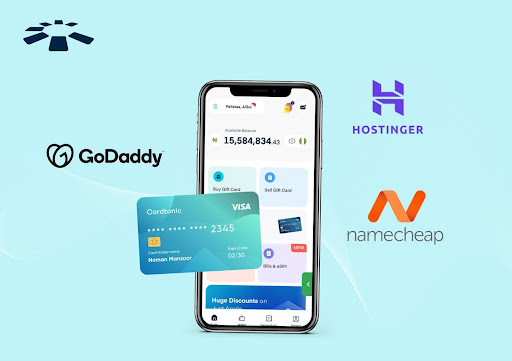
A few months ago, a friend of mine finally decided to launch his website. He has perfected everything, from the content to the logo, and even selected a suitable domain name on Namecheap. Excited, he clicked checkout, entered his card details, and waited. Then he got the response “Payment declined.” He tried again, same response. He switched to another card, but still declined.
Frustrated, he almost gave up. How could something as simple as paying for web hosting be so hard?
If you’ve ever tried paying for platforms like Hostinger, Namecheap, or GoDaddy from Nigeria, you probably relate to Ayo’s frustration. Many local debit cards don’t support international payments, and that can be very discouraging.
My friend was able to make a payment using a virtual dollar card, without stress, card rejections, or long delays. In this guide, I’ll show you exactly how to pay for Hostinger, Namecheap, or GoDaddy with a virtual dollar card.
How to Pay for Namecheap, Hostinger, or GoDaddy with a Virtual Dollar Card
To pay for Namecheap, Hostinger, or GoDaddy, you need to create a virtual dollar card first, verify your account, generate your card, and fund your virtual dollar card. Then, log in to your Hostinger, Namecheap, or GoDaddy, choose a hosting plan, and choose Credit/Debit Card as your payment method. Enter your virtual dollar card details, confirm payment, and your website will be live.
Get a Virtual Dollar Card:
To get a virtual dollar card, the first step is to sign up on a trusted platform like Cardtonic.
- Go to the Google Play Store or App Store and download the app Cardtonic and create an account.
- Provide a means of identification for details verification, then fund your wallet.
- Go to the home page and click on “virtual dollar card.”
- You’ll see the cost of the card. Click on “proceed” to continue.
- Choose the card you want and fill in your billing address.
- Finally, click on “create virtual card.”
You can watch the video below for a more detailed step-by-step guide on
Fund your Virtual Dollar Card
Funding your virtual dollar card is not difficult. If you are using a Cardtonic virtual dollar card, you can fund your card with Naira or by selling unused gift cards.
- Open your Cardtonic app and click on “Virtual Dollar Cards.”
- Then click on “Fund Card.”
- Input the desired amount, which can be in Naira or Dollars.
- Click on “fund card,” and your card will be funded from your wallet.
How to Pay on Hostinger, GoDaddy, or Namecheap
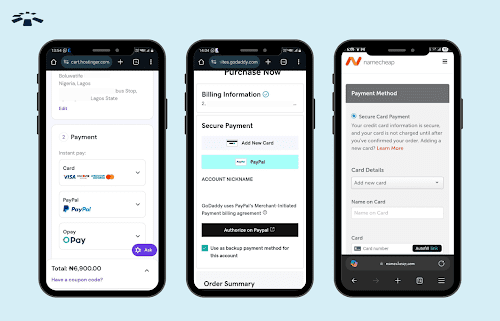
Option 1: Using Cardtonic virtual dollar card directly.
- Go to your desired hosting page (Hostinger.com, Namecheap.com, or GoDaddy.com).
- Choose your desired hosting plan
- Click on “Checkout.”
- Select “Card Payment.”
- Enter your virtual dollar card details.
- Confirm payment.
Option 2: Linking Cardtonic Virtual Card with PayPal
- Log in to your PayPal account.
- Go to the payment methods section and add your Cardtonic virtual dollar card.
- Click on pay through PayPal on your desired hosting page.
- At checkout, select PayPal as your payment method.
- Authorize the transaction in PayPal using your linked Cardtonic card
Frequently Asked Questions About How to Pay for Namecheap, GoDaddy and Hostinger in Nigeria.
1. Can I Really Pay for Web Hosting in Nigeria?
Yes! If you are having difficulties paying using your regular debit card, a virtual dollar card will make the payment easy. It’s designed specifically for dollar transactions, so to pay for hosting in Nigeria, just use a virtual dollar card.
2. Is a Virtual Dollar Card Safe for paying on GoDaddy?
Definitely! Virtual dollar cards are made for online payments, so they come with extra security. And when you use one from Cardtonic to pay on GoDaddy, your transaction will run smoothly.
3. Which Virtual Dollar Card Can I Use for Namecheap?
The Cardtonic Virtual Dollar Card is one of the best you can use. It works on most international websites, like Netflix, Facebook, and Namecheap, so you don’t have to worry about random declines.
4. What is the Best Payment Method for Hostinger?
The best payment method for Hostinger is one that is secure, works smoothly, and doesn’t give you stress. You can get all of these when you use Cardtonic virtual dollar cards. They’re widely accepted, safe, and reliable.
5. What Should I Do if my Payment is Declined?
This happens sometimes. If this happens, here’s what you should do: Double-check your card details, make sure you have enough funds in your card, and reach out to customer support for help. Most times, the issue gets resolved in no time.
6. What is Cheapest Web Hosting in Nigeria?
If you’re on a very tight budget, there are a few affordable hosting options in Nigeria. They offer cheap plans that are perfect for beginners who just want to get started without spending too much.
That said, many people still prefer international platforms like Namecheap, GoDaddy, and Hostinger. Because they often come with better performance, more features, and regular discounts. Their starter plans are also surprisingly affordable. Some of their plans start from as low as $1.58 to $1.95 per month, especially when they’re running a promo.
Conclusion
If you’ve ever struggled to pay for Hostinger or Namecheap like my friend, just know that you’re not alone. A lot of people in Nigeria face the same issue.
The good news is that with a virtual dollar card, you can skip all the stress of declined payments and enjoy smooth, hassle-free transactions on platforms like Hostinger, Namecheap, and GoDaddy. It’s simple, secure, and made for international payments.
So, whether you’re starting a business or building your first website, Cardtonic virtual dollar cards will make the whole process much easier.


 Get on iPhone
 Get on Android