6 mins read Gift Card Guides
How To Use A Vanilla Gift Card Online (2026): Register, Activate & Pay
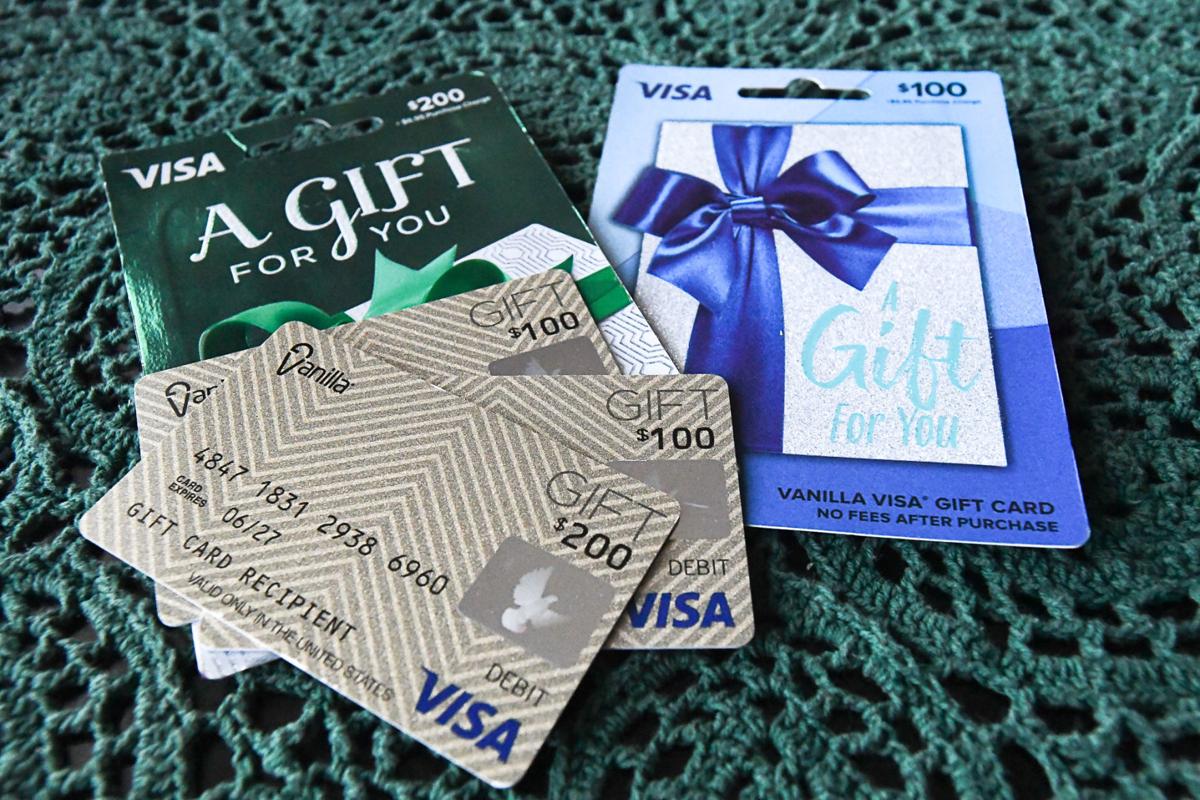
Vanilla Gift cards are often regarded as the best-prepaid cards for doing any online or in-store purchases where Visa is accepted. Once you have a Vanilla Gift card account, they can be used practically as debit cards to pay for various bills such as electricity bills. Vanilla Visa is one such gift card that is highly popular, very convenient for online purchases, and comes in other variants. More people choose the Vanilla Gift Card over any other prepaid card on the market because they are safe, secure, reliable, and easy to use.
How to Use Vanilla Gift Card Online

Vanilla gift cards work just like debit cards or Mastercard credit cards, so checkout follows essentially the same step as any other card payment. Here’s exactly what to do when you want to pay for your online shopping or any other digital purchase:
Add your items to the cart and head to checkout on the shopping site.
- At the payment step, select “Credit” or “Debit” as your card type, never the “Gift Card” field, since Vanilla cards aren’t recognised there.
- Enter your 16-digit card number, expiry date, and the CVV code on the back of your Vanilla card.
- When asked for a billing ZIP code, use the ZIP code you registered the card with, not necessarily your actual home ZIP if it’s different.
- Confirm the order and complete checkout.
- If the payment is declined, double-check your registration details and your remaining balance before trying again.
What If Your Balance Is Not Sufficient For The Transaction?
It’s common for a Vanilla gift card balance to fall short of your total, especially once shipping gets added. If that happens, here are two workarounds that actually work:
- Buy a merchant gift card (Amazon, Walmart, etc.) worth exactly your remaining Vanilla balance, then stack that gift card with another payment method at checkout.
- Load the remaining balance into a store’s wallet app (like the Walmart or Amazon app) and burn it down as partial payment before switching to another card for the rest.
Vanilla gift cards can also show error if they are not registered. We’ll explore that in detail in the activation and registration section below.
If you’re in Nigeria or Ghana and don’t actually need the card, it’s often simpler to sell your Vanilla gift card for cash instead. I will show you how to at the end of this guide.
Where Can You Use a Vanilla Gift Card?
You can use a Vanilla gift card anywhere Visa or Mastercard debit cards are accepted in the U.S. This means on-site or if online, via U.S. sites. This opens up a wide range of places including:
- Online marketplaces & retail: Amazon, Walmart, eBay, Target, Best Buy
- Food delivery & dining: DoorDash, Uber Eats, Grubhub
- Subscriptions & digital services: Netflix, Spotify, Hulu
- In-store: Grocery stores, gas stations, pharmacies, department stores
However, you should note that:
- Some subscription payment platforms that give you free trials will block prepaid or gift cards outrightly, because they want a card that can be charged automatically later.
- Non-US websites generally won’t accept it, because Vanilla gift cards are a US-only product.
How to Activate and Register Your Vanilla Visa Gift Card

Activating and registering your card are two different steps. Skipping either one is the most common reason people run into “card declined” messages.
To activate your card:
- If you bought it at a retail location, the cashier can activate it for you right at the store.
- You can also activate it online at balance.vanillagift.com.
- Or call the toll-free number printed on the back of the card and follow the prompts.
- During activation, you’ll set a PIN. Keep it somewhere safe, since some in-store terminals ask for it.
To register your card:
- Head to balance.vanillagift.com and select the registration option.
- Enter your full name, billing address, and ZIP code exactly as you want them tied to the card.
- Confirm your details and save them.
Registration is important because most websites run an address verification check (AVS) at checkout. What this means is they compare the billing address you entered while checking out with what’s on the card. If there’s no address on the card or it doesn’t match, your payment gets declined.
Another tip to note: use your real name and an address you’ll actually remember. Registering with any detail just to “get it over with” can get you stuck later, so it’s best to avoid it.
Using Your Vanilla Gift Card on Amazon
As it stands, the most common complaint online is “why isn’t my Vanilla card working on Amazon” and this is because Amazon is one of the trickier places to directly use your Vanilla gift card. Usually, it’s one of two things. Either your remaining balance is lower than your total order amount or your card’s registered address does not match what you entered at checkout. Here are two ways to go about it:
Option 1: Reload your Amazon gift card balance (the more reliable route)
- Go to Your Account, then click ‘ Gift Cards’
- Click ‘Reload Your Balance’
- Enter the Vanilla card as the payment method. Ensure the amount is the same or lower than your current Vanilla balance.
- Once the funds land in your Amazon gift card balance, use that balance normally at checkout.
Using this method evades both problems mentioned earlier.
Option 2: Add it as a payment card
- Go to Your Account, then click ‘Payment options’
- Click ‘Add a payment card’
- Enter your Vanilla card details along with your registered billing address.
This works, but Amazon is usually strict about balance and address matching, so it usually fails more often than people expect.
How to Check Your Vanilla Gift Card Balance
Confirming your balance before you check out is very important to avoid outright decline just because your balance is less than your order amount. To check your balance, there are 3 methods:
- Online: Visit balance.vanillagift.com and enter your card number and security code.
- By Phone: Call the toll-free number printed on the back of your card and follow the prompts given.
- In-store: Ask the cashier at checkout, or check your receipt for the remaining balance after every purchase.
Frequently Asked Questions About Using Vanilla Gift Cards Online
- Why Won’t My Vanilla Gift Card Work Online?
The reason for this usually comes down to one of three things. Either you selected “Gift Card” instead of “Credit/Debit” at checkout, your card isn’t registered yet, or your remaining balance is lower than the order total. Double-check all these three things before assuming the card is faulty.
- Do I Need A Pin To Use A Vanilla Gift Card?
You’ll usually set a PIN during activation. For most online purchases though, you won’t be prompted for a PIN; just the card number, expiry, CVV, and registered ZIP code.
- What Zip Code Do I Use For A Vanilla Gift Card?
Use the ZIP code you entered when you registered the card at balance.vanillagift.com, not necessarily your home ZIP code. Whatever ZIP you registered is the one the merchant’s address check will look for.
- Why Is My Vanilla Gift Card Not Working On Amazon?
Amazon frequently declines Vanilla cards added directly as a payment method if the balance is short of the order total or the address doesn’t match. The more reliable fix is reloading your Amazon gift card balance with the Vanilla card instead of adding it as a direct payment method.
- Can I Use A Vanilla Gift Card For Partial Payment If My Balance Is Low?
Most merchants won’t allow you to split one transaction across two cards. Instead, you can buy the shopping store’s gift card with your remaining Vanilla balance and stack that with another payment method, or load the balance into the store’s wallet and use it as a partial payment there.
- Can I Use A Vanilla Gift Card Without A Name Registered On It?
No, including your name and address during registration is required to use a gift card successfully. Skipping this registration is one of the top reasons why a card gets declined at checkout.
In Nigeria or Ghana? Sell Your Vanilla Gift Card For Cash
Not every Vanilla gift card needs to be spent online. If you’re in Nigeria or Ghana and would rather have cash in hand, you can sell your unused Vanilla gift card on Cardtonic for naira or cedis. Use the rate calculator to see what your card is worth today, then cash out fast and securely.
Conclusion
Online shopping is fun. With a vanilla gift card, it becomes much more exciting. Because, unlike other gift cards, this is not designated to a particular brand. You can redeem it anywhere Visa is accepted as a means of payment. This way you have a much wider selection of places to shop.
If your Vanilla Gift card is not working, click here to learn about the possible errors and how to fix them.
.

 Get on iPhone
 Get on Android